Cycle Savvy
Finding the right bike, even for an experienced cyclist, is not simple. Users can be easily overwhelmed by too many options, cluttered layouts, unclear product differences, and a frustrating checkout experience.
CycleSavvy is an e-commerce company that sells high-quality bikes to research-driven cyclists, but is experiencing a significant site abandonment issue.
Project Overview
Role: UX/UI Designer
Timeline: 8 weeks
Platform: Mobile website
Focus Areas: Product comparison, filtering, and checkout optimization
The Problem
Business Problems Identified:
High drop-off rate after users viewed multiple product pages.
Site abandonment issue during the checkout experience caused by account creation requirements.
To address these challenges, I enhanced the shoppers' experience by streamlining the browsing and checkout experience to support confident decision-making. Catering to the experienced cyclists’ core needs of simplified layouts with optimal information, critical filtering options, and reducing friction in the checkout experience.

To address the identified usability issues, I structured the project into six phases spanning discovery, design, validation, and iteration.

Project Planning

Competitive & Secondary Research
To better understand the problem space, I conducted a competitive analysis of Target, Amazon, and Trek Bikes. This allowed me to evaluate how users navigate bike shopping experiences and how existing companies address cyclist-specific needs.
To deepen my insight into user behavior when purchasing high-cost products, I complemented this with secondary research. I focused on decision-making, site abandonment, and Cyclist-specific shopping behaviors.
Key Research Themes:
Information Overload- Dense product pages make comparison difficult
Decision Confidence- Users seek reassurance when purchasing an expensive item
Checkout friction- Forced account creation increases site abandonment
These findings established the foundation for the design direction and informed the features prioritized in later stages.
Research Synthesis- Affinity Map & Persona
To make sense of my research, I translated my findings into an affinity map and a persona. The affinity map helped expose patterns across users' behaviors and experiences. While the persona grounded those insights in a specific, research-driven audience, to ensure design decisions remain focused. Utilizing these patterns and persona to guide actionable changes in the design.
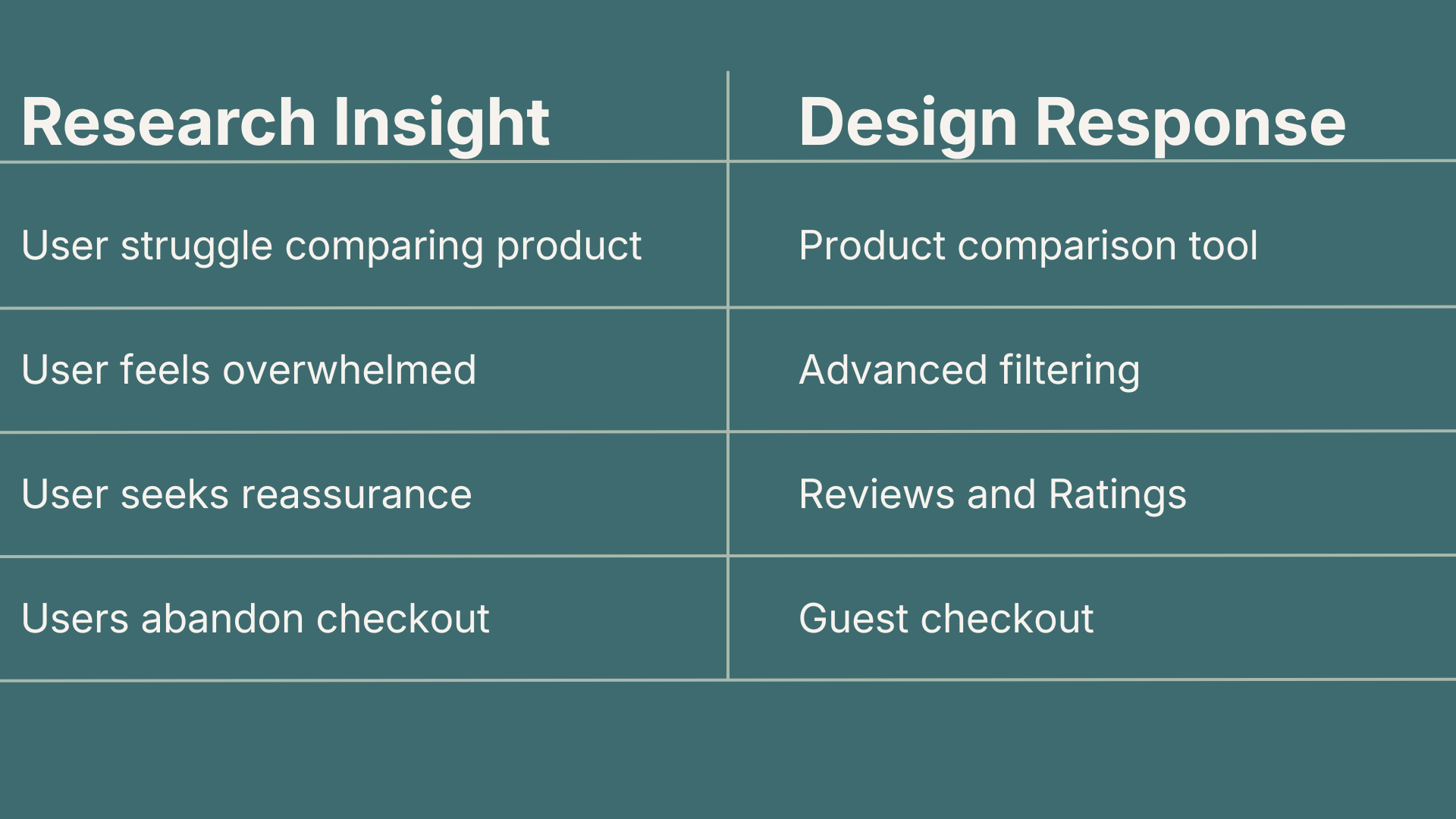
Together, these insights highlighted the need for clear decision-making tools, reduced friction, and building trust with users throughout their experience. This steered my design direction toward comparison tools, streamlining the checkout process, and reinforcing the user’s confidence through clear item information and community feedback.
Information Architecture- User Flows
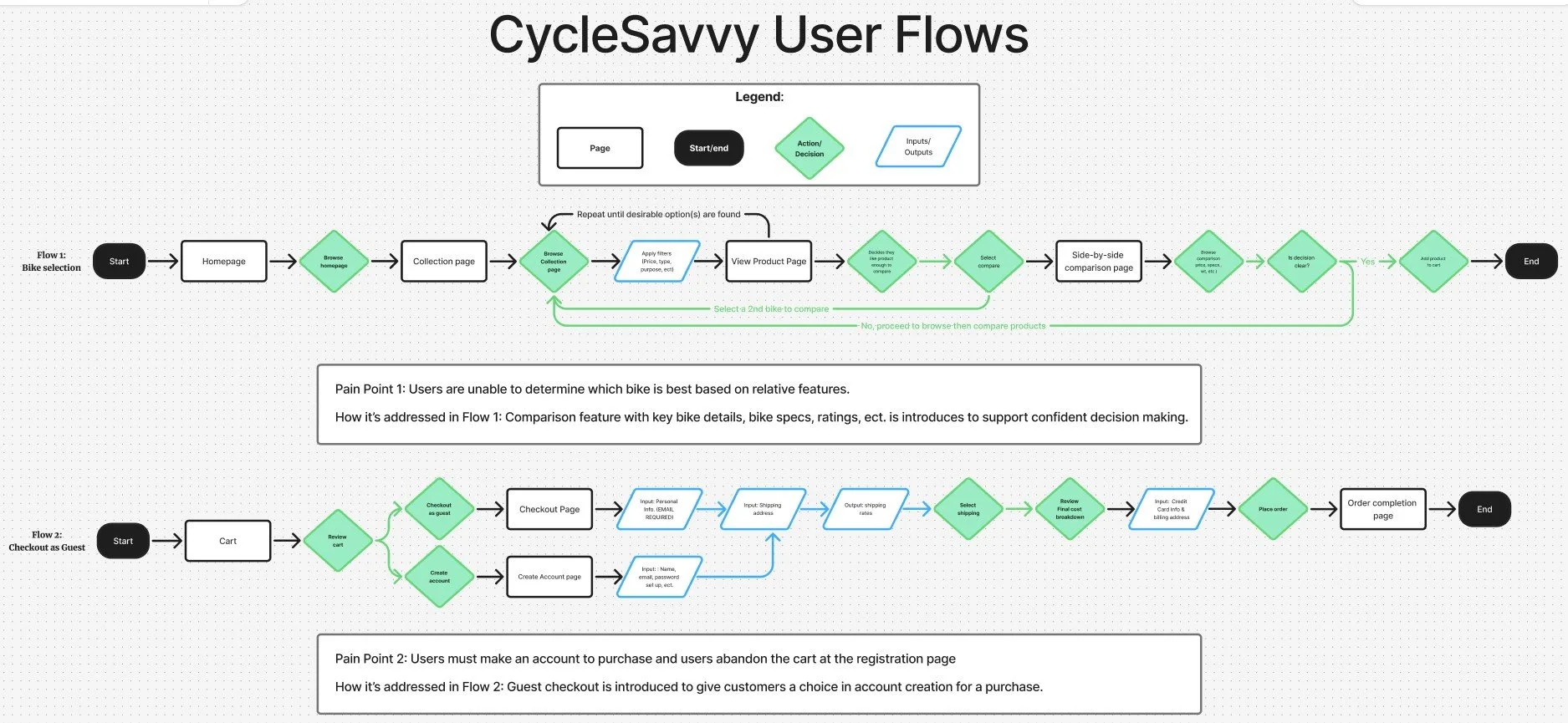
Once I clearly understood the problem space and user needs, I mapped out key user flow routes. I visualized how users move through the experience, specifically red routes, like the product discovery, product comparison, and checkout.
Pain Points
Users are unable to identify which bike is best based on relative features
Users must make an account to purchase a bike.
Key Improvements
Added a product comparison flow
Ratings for community validation incorporated
Filtering to streamline navigation
Introduced a guest checkout flow
Once the pain points in the flow were identified, I began aligning users' needs from my research with actionable solutions. Intentionally implementing these features where they would have the greatest impact. Ultimately, alleviating overwhelm by creating a smoother browsing experience and supporting confident decision-making in a way that feels natural to the user's shopping experience.

Low Fidelity Wireframes
Guided by my research insights and persona, I explored early design solutions through low-fidelity wireframes. Focusing on simplifying browsing and product page layout without sacrificing essential information. Detailed information is crucial for a high-value purchase, especially for the desired audience that is research-driven.
Key Features
Filtering - Allows users to quickly navigate through products and reduces cognitive load
Product Comparison - Side-by-side comparison improves user decision-making confidence
Guest Checkout - Removes friction at the point of commitment to reduce abandonment


Usability Testing Round One
My low-fidelity wireframes served as a foundation for testing core functionality and validating early design decisions. The first round of usability testing included five participants, all familiar with making high-cost purchases online.



High Fidelity Wireframes
Taking my findings from the initial round of usability tests, I refined my design to address key friction points. These updates focused on improving clarity, supporting critical decision-making moments, and reinforcing trust.
Design Improvements
Checkout Transparency: Multiple shipping methods were introduced with clearly displayed costs on the checkout page.
Purchase Confidence: Additional order summary and confirmation screens to reassure the user and boost trust.
In addition to functionality improvements, visual design played a pivotal role in shaping the user's overall experience with CycleSavvy. The company’s color palette was applied to reflect the brand's focused and performance-driven personality while maintaining a clean and intuitive interface. Strategic color incorporation gave life to the storytelling and dependable experience of each route. This elevated the experience of the flow from functional to a cohesive high-fidelity prototype.
Usability Testing Round Two
After refining the high-fidelity prototype, I conducted a second round of usability testing with 5 participants familiar with high-cost purchases. To better reflect CycleSavvy’s audience, the majority of the participants were male, aligning with the 72% male demographic. Testing focused on product browsing, comparison functionality, and validating checkout improvements.
Overall, users responded positively to the updated experience. Detailed filters were especially well received, with participants noting how efficiently they were able to narrow down options. On the product pages, customer reviews, simplified layouts, detailed specifications, and the addition of a manufacturer's video improved product clarity and engagement. However, the placement of the video in the product details created confusion, as most users felt the media was out of place.
The comparison feature was revealed to be a more critical issue. When prompted to select a bike to compare, users skipped the selection step and proceeded to the “compare” action. This pattern was consistent across all participants, indicating that this was a critical issue regarding interaction clarity.
While checkout improvements reduced some friction, specifically with the shipping methods, there was still hesitation at the final point of commitment. Even with the order summary, users still sought additional reassurance. Often wanting to reconfirm the product name or view a photo of the bike before completing their purchase. This behavior suggests that additional validation is needed to support user confidence at the final step of purchase.

Final High Fidelity Wireframes
Using insight from the second usability test, I began refining my high-fidelity wireframe designs a final time. These final iterations were concentrated on improving interaction clarity, informational hierarchy, and reinforcing user confidence during the checkout process.
Final Design Changes
Media Carousel - Relocated the manufacturer’s video to align with user expectations and added an arrow icon to indicate scrolling behavior.
Visual Feedback in Comparison Selection - Each bike on its own individual product card makes a distinction that each bike holds a separate selection.
Image Validation - Added the product image to the final order summary at checkout
Reflection
This project challenged me to move beyond the simple organization of research and focus on synthesizing insights into meaningful design solutions. Learning to identify patterns across different research methods and translate them into viable solutions that not only improve usability but also support user confidence.
Balancing the level of detail required for a research-driven cyclist while preventing decision fatigue proved especially challenging. I had to be intentional about the content and how it was presented, ensuring users could access important specifications without feeling overwhelmed. Establishing a clear informational hierarchy became key to creating a cohesive design that maintained both clarity and engagement.
If I were to continue this project, I would explore the comparison features further, as the final usability tests revealed some confusion within that flow. I would also conduct an additional round of usability testing with participants who identify as research-driven. This would provide better insight into how a research-oriented user would interact with this design experience.